Imagine a business that receives incoming inquiries through its website, a shared sales inbox, and the phone. Its CRM automatically assigns an owner to each new record. Yet every morning, staff still have to open multiple tabs to investigate whether the caller is tied to an existing account, check shared email threads for previous pricing or scheduling commitments, figure out whether the request belongs with sales, estimating, or service, and manually reassign the record to the right person.
When that happens, the problem isn't necessarily your lead routing software. It is the uncoordinated operational work surrounding the routing decision.
Before purchasing a new routing platform or commissioning custom automation, an operations leader needs to answer a practical question: where is the routing breakdown actually happening? Depending on the answer, the right fix falls into one of three approaches:
- Native CRM lead routing, when the fields needed to assign ownership already exist inside your CRM.
- Dedicated lead routing software, when your team needs stronger matching, rep availability checks, weighted distribution, and response-time SLAs inside your CRM and calendar stack.
- Custom workflow engineering, when routing depends on operational context across disconnected systems or coordinates handoffs beyond a standard sales queue.
Key Takeaways
- Evaluate native CRM capabilities first: Built-in assignment rules and workflows in platforms like Salesforce and HubSpot handle straightforward territory and team distribution well when intake data is structured.
- Dedicated routing platforms solve complex CRM distribution: Specialist products like LeanData and Chili Piper provide advanced lead-to-account matching, calendar sync, weighted pools, SLA escalations, and audit logs without writing code.
- Custom engineering bridges multi-system gaps: Custom orchestration becomes relevant when routing decisions depend on shared inboxes, PDF attachments, field databases, or cross-department approvals that packaged connectors do not cover.
- Separate information retrieval from assignment authority: AI can extract context from unstructured emails and documents, but deterministic business rules and human approval gates should govern who owns the customer relationship.
Comparing Native CRM Rules, Lead Routing Software, and Custom Engineering
Many comparisons group built-in CRM features and specialist routing platforms together as generic "off-the-shelf" software. In practice, native CRM tools, dedicated lead distribution software, and custom engineering solve very different operational problems.
1. Native CRM Automation (Salesforce & HubSpot)
Modern CRMs include native routing tools designed to evaluate record properties and assign ownership inside the platform.
What Native CRM Automation Does:
- Evaluates structured record fields and conditions (such as geography, product interest, company size, or lead source).
- Assigns records to individual owners or shared team queues.
- Distributes records across eligible team members using conditional workflow branches.
- Preserves or overwrites existing ownership depending on configuration.
Platform Mechanics and Requirements:
- Salesforce: According to Salesforce Help documentation on Lead Assignment Rules, admins configure numbered rule entries that evaluate record fields or formulas in sort order, assigning the lead to a user or queue on the first match. Only one Lead Assignment Rule can be active at a time. Lead Assignment Rules are only one part of Salesforce's automation toolset: teams that need multi-step record lookups, custom object checks, or conditional branching inside Salesforce often use Salesforce Flow, which offers much broader orchestration at the cost of more administrative design and testing.
- HubSpot: According to HubSpot Knowledge Base documentation on assigning and rotating record owners, the "Rotate record to owner" workflow action distributes contacts, companies, deals, tickets, or leads across selected users or teams, with an option to either overwrite an existing owner or only assign unowned records. Using owner rotation in workflows requires a Sales Hub or Service Hub Professional or Enterprise subscription and an active paid Sales or Service seat for each user receiving rotated assignments, alongside additional distribution modes available for specific lead and ticket workflows.
When Native CRM Automation Is Sufficient: When inquiries arrive with complete form fields, routing criteria already live inside your CRM records, and your team has the admin capacity to maintain rules or flows inside the platform, native CRM lead routing is typically the most practical choice.
2. Dedicated Lead Routing Software (Chili Piper, LeanData & Zapier Lead Router)
When a sales organization needs more sophisticated distribution mechanics than standard CRM rules provide, specialist lead routing software is purpose-built for the job. These platforms are far more capable than basic round-robin tools:
- Chili Piper (Distro): Designed for revenue teams, Chili Piper provides a visual routing builder with Lead-to-Account matching (linking incoming leads to existing CRM accounts so inquiries route to the established account owner), territory and segment rules, weighted round-robin distribution, real-time calendar and out-of-office availability checks, instant scheduling handoffs, and response-time SLAs that alert managers or reassign untouched leads.
- LeanData: Built natively for Salesforce, LeanData combines fuzzy Lead-to-Account matching and configurable tiebreakers (across company name variations, domains, addresses, or account hierarchies) with its visual FlowBuilder for routing Leads, Contacts, Accounts, Opportunities, and Custom Objects. It supports capacity and territory pools, concurrent SLA tracking, and detailed audit logs that show the exact rule path every record followed.
- Zapier Lead Router: Positioned as a lightweight option for teams already using Zapier, Zapier Lead Router lets admins set up territory or field-based queues, distribute leads via even or weighted round-robin across sales reps, and assign a fallback rep without adopting an enterprise RevOps platform.
When Dedicated Routing Software Fits Best: A B2B sales organization with an established Salesforce or HubSpot environment that needs reliable account matching, rep PTO and calendar calibration, SLA re-routing, and self-serve RevOps administration is typically well served by a specialist platform like LeanData or Chili Piper. Teams with straightforward routing requirements between web forms and a CRM often find a lightweight tool like Zapier Lead Router sufficient.
3. Custom Workflow Engineering
Custom workflow engineering is not a competing SaaS product or an automatic upgrade over specialist routing tools. It becomes relevant when a business needs information or processes from systems that are not adequately covered by its existing routing configuration and available integrations.
When Custom Engineering Becomes Worthwhile:
- Commitments in shared inboxes: Routing depends on prior pricing, scope, or account-handling agreements recorded in shared email threads (
sales@...,estimates@...,support@...). - Requirements inside attachments: Inquiries arrive with PDF drawings, equipment lists, or intake packets that must be parsed to determine the right estimator or department.
- Historical service records: Assignment depends on job history, technician continuity, or site access notes stored in an external field-service or operational database.
- Cross-system approval gates: High-value or sensitive requests must check accounting status, credit holds, or compliance rules before an owner is assigned.
- Multi-department coordination: An incoming request triggers coordinated actions across sales, estimating, dispatch, and account management rather than a single CRM owner field.
Implementation Options and Responsibilities: Addressing these gaps does not always require building software from scratch. Depending on the stack, an engineering partner may extend your existing CRM workflows, connect tools using an integration platform, or build a custom orchestration service around your APIs. However, any custom integration introduces real responsibilities: initial engineering and testing, credential security, role-based access controls, handling third-party API updates, and ongoing monitoring and maintenance.
Build vs. Buy Decision Framework
The table below compares all three options in practical business terms so you can identify which level of automation matches your operations.
| Decision factor | Native CRM | Dedicated routing product | Custom workflow engineering |
|---|---|---|---|
| Best suited for | Businesses where standard web forms and CRM fields already capture everything needed to assign an owner. | Sales teams that need fast distribution, existing-account matching, and follow-up tracking inside their CRM. | Businesses where routing depends on emails, documents, service history, or handoffs across multiple departments. |
| Routing complexity | Straightforward rules or internal CRM workflows based on standard record fields. | Advanced sales routing, including parent-account matching, territory overlays, and multi-step visual rules. | Multi-system business logic that combines CRM data with information from operational, billing, or service tools. |
| Information sources | Data stored on CRM records and connected CRM objects. | CRM records, enrichment data, and connected rep calendars. | CRM records plus shared email inboxes, call transcripts, PDF attachments, service databases, and accounting systems. |
| Distribution logic | Direct assignment to a user or queue, or basic team rotation in eligible CRM tiers. | Even or weighted round-robin, rep capacity, vacation/calendar availability, and existing account ownership. | Custom business rules, specialist continuity checks, departmental routing, and multi-system validation. |
| Exception handling | Default owner or fallback queue for manual review. | Automated response-time reminders, re-routing when a rep does not respond, and visual routing logs. | Custom hold rules, backup owner routing, and one-click manager approvals in Slack, Teams, or email when records conflict. |
| Cross-system coordination | Varies by CRM edition, workflow tier, and installed marketplace integrations. | Strong integration across major CRMs, calendars, and sales engagement platforms. | Built specifically to connect industry software, internal databases, email inboxes, and CRMs that do not sync natively. |
| Maintenance responsibility | Managed by your internal CRM administrator within platform tier limits. | Vendor maintains the software; your sales or RevOps admin manages the routing rules; recurring software license. | Requires ongoing monitoring of integrations, security permissions, and business rules by internal technical staff or an engineering partner. |
| When to choose | Your CRM already holds the right data and your team just needs consistent assignment rules. | Your bottleneck is sales distribution speed, rep availability, and account matching inside Salesforce or HubSpot. | Your staff still manually investigate emails, documents, or other systems before they can route or act on an inquiry. |
Three Practical Scenarios: Recognizing Your Situation
Scenario 1: Native CRM Is Enough
A regional equipment distributor receives website quote requests with structured fields for ZIP code, product category, and company size. Each territory has an assigned representative, and general service questions go to a shared support queue.
Why Native CRM Fits: Every detail required to assign the inquiry is already on the form. Configuring Salesforce Lead Assignment Rules (or Salesforce Flow) or a HubSpot owner-rotation workflow solves the problem using software the company already pays for.
Scenario 2: Dedicated Routing Software Makes Sense
A B2B organization runs Salesforce with 20 account executives and inbound sales reps. Inquiries frequently arrive from contacts at companies that already have an assigned Account Executive. For net-new companies, leadership wants weighted round-robin distribution by territory, automatic skipping when a rep is on vacation on Google Calendar, and automatic reassignment if a lead goes untouched for 15 minutes.
Why Dedicated Software Fits: Platforms like LeanData and Chili Piper are built specifically for this environment, providing lead-to-account matching, calendar sync, SLA timers, and audit logs out of the box. If a smaller team simply needs weighted round-robin queues from web forms into their CRM without enterprise SLA management, Zapier Lead Router can handle that distribution directly.
Scenario 3: Custom Workflow Engineering Makes Sense
A commercial property services firm receives inquiries through web forms and a shared estimating inbox (estimates@...), often with PDF project specs attached. Before assigning the inquiry, the team has to solve three connected problems:
- Identifying existing client relationships: Site managers often submit requests using a building name or personal email address rather than the parent property management company's domain recorded in the CRM.
- Checking recent commitments and specs: A project coordinator may have already discussed pricing or preferred estimator continuity in the shared inbox, and the attached PDF specifies whether the job requires commercial retrofit estimating or routine maintenance dispatch.
- Coordinating across departments: Depending on the scope in the attachment, the inquiry either needs a CRM opportunity assigned to the parent account's senior estimator or a work order staged in the field-service platform.
Why Custom Engineering Fits: While a CRM or specialist router can match an email domain, it will not parse an attached PDF scope sheet, check a shared estimating inbox for recent commitments, and stage records across both a CRM and a field-service system. Extending the workflow with custom integration logic automates that lookup and routing without replacing either core system.
How Customer Context Outside the CRM Affects Routing
Dedicated routing platforms handle CRM account matching very well. The reason some businesses still struggle with manual reassignments is that important operational context lives outside structured CRM fields:
- Existing relationships masked by incomplete intake: A site contact reaches out from an unrecognized email address, even though the physical property address matches active service records in an operational database.
- Explicit customer preferences: A client replies in an email thread asking to keep a specific estimator or bilingual specialist on their account.
- Recent service or billing issues: An open installation issue in the field-service system or an overdue balance in accounting means a new request should go to an account manager rather than a standard sales queue.
- Agreements in shared email threads: Turnaround commitments or scope notes confirmed in a shared inbox that were never copied into CRM properties.
- Operational constraints in job reports: Past service reports noting required safety certifications, equipment specs, or facility access windows.
Retrieval Capability vs. Authority to Act
When connecting these sources to a custom lead routing workflow, it is critical to separate the ability to retrieve information from the authority to act on that information. Just because an automated system can read an old email or call note does not mean that note should automatically override an established CRM account owner.
To keep routing reliable and auditable, extracted context should follow strict governance rules:
- Authorized sources only: Scope extraction strictly to business-owned channels such as shared operational inboxes (
sales@...,dispatch@...), recorded support lines, and service databases - never private employee messages. - Source links and timestamps: Every extracted note must store a reference link and timestamp so outdated complaints or temporary scheduling requests expire automatically.
- Explicit requests vs. internal assumptions: A client writing "Please keep Maya on our quotes" is tagged as a verified preference, whereas an internal comment saying "They probably want morning appointments" remains an advisory note for the rep.
- Conflict validation and human approval: When a verified email request conflicts with the assigned owner in the CRM, the workflow should pause automatic reassignment and ask a manager for one-click confirmation.
- Deterministic rules govern assignment: AI models can extract and summarize unstructured text, but deterministic business rules must make the actual routing decision.
Architectural Option: Pre-Indexing Context for High-Volume Teams
If a business only needs to check one or two recent records at intake, the workflow can query those systems directly when an inquiry arrives. However, when historical context spans large shared inboxes, call transcripts, and service logs, searching everything at the moment of form submission can slow down response times.
In those cases, an effective architectural option is background pre-indexing - extracting and updating a concise Customer Context Profile asynchronously as emails and service reports arrive, similar to how AI email agents process inbox updates in the background.
| Source | Context Extracted | Role in Routing |
|---|---|---|
| CRM Records | Parent account links, current owner, order history. | Supports account-based routing and owner continuity. |
| Shared & Support Inboxes | Named contacts, past commitments, preferred channels. | Captures explicit client requests left out of web forms. |
| Call Transcripts | Urgency cues, recurring complaints, rep requests. | Surfaces expectations callers state on the phone. |
| Service & Job Reports | Site access rules, equipment specs, prior specialists. | Preserves technician or estimator continuity on repeat work. |
Practical Implementation: How an Engineered Routing Pipeline Runs
To see how these pieces fit together in production, the diagram and sequence below show what happens at each stage of a cross-system routing pipeline - including what information enters, what decision occurs, how missing data is handled, and which systems are updated.
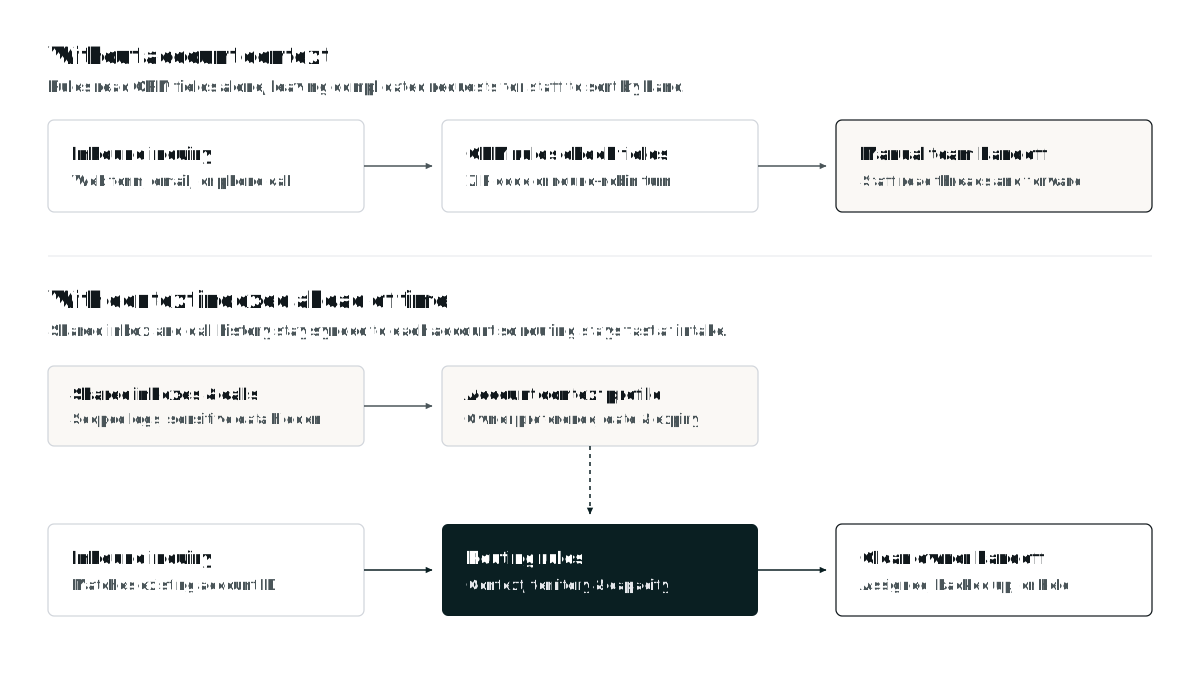
Outcome-Oriented Implementation Sequence
- Inquiry Intake:
- Input: A web form submission, inbound shared-inbox email, or call summary webhook arrives.
- Decision: Standardize contact details, physical address, and any attached documents into a uniform intake payload.
- If information is missing: If required fields (such as service address or scope) are absent, trigger an automated follow-up request or route to an intake triage queue rather than running incomplete rules.
- Customer & Account Identification:
- Input: Email domain, phone number, and normalized street address.
- Decision: Check the CRM and operational database for an existing contact, parent account, or active job site.
- If information is missing: If no match exists, mark the inquiry as net-new; if multiple accounts match ambiguously, flag the record for review.
- Context Retrieval & Validation:
- Input: Matched account ID and any pre-indexed or live operational notes (owner preferences, open service tickets, accounting status).
- Decision: Verify timestamps and source authority, separating confirmed routing rules from advisory prep notes.
- If information is missing: Proceed using standard CRM territory and service-line criteria.
- Deterministic Rule Evaluation:
- Input: Validated inquiry specs, account ownership, specialist history, and rep availability.
- Decision: Apply the business's explicit routing hierarchy (for example: active parent-account owner first, specialist continuity second, territory capacity third).
- If information conflicts: If CRM ownership clashes with a recent customer request or an active escalation flag, divert the record to a one-click manager approval step.
- System Updates & Team Notification:
- Input: Final routing decision and context summary.
- Systems updated: Update the CRM owner, create or link the opportunity or work order in the operational system, alert the assigned rep (or designated backup) in Slack, Teams, or email with a short context brief, and write a permanent audit log entry explaining why the assignment was made.
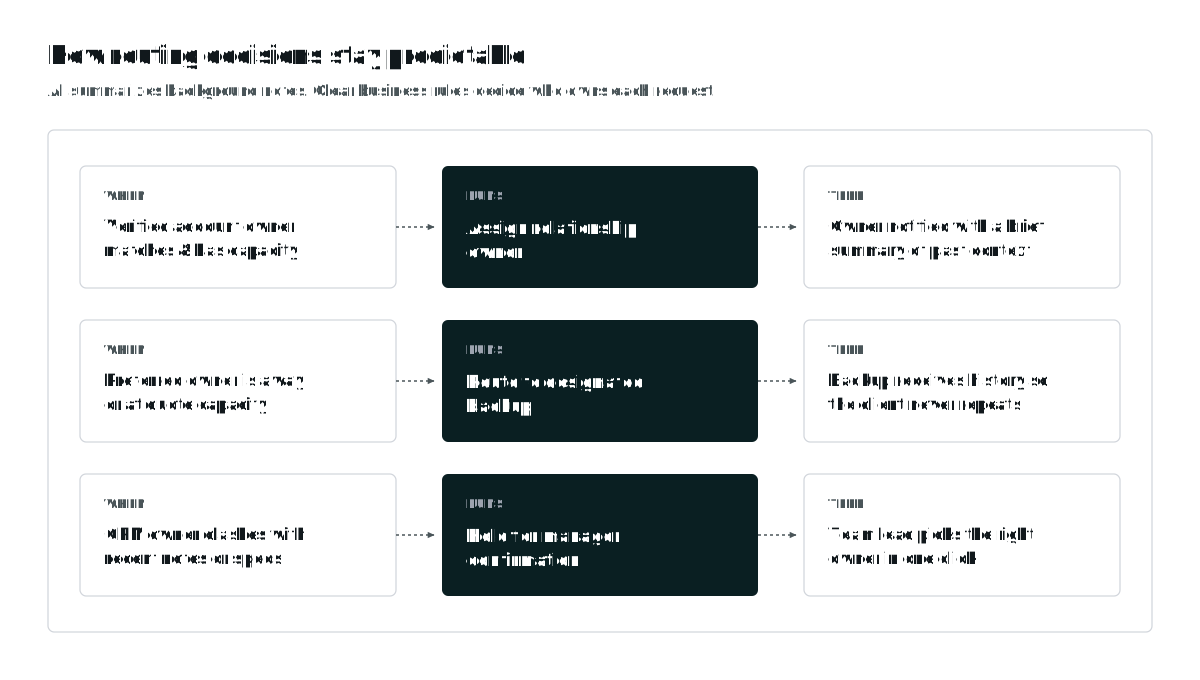
Routing Decision Matrix
| Scenario | CRM Fields Show | Operational Context Adds | Routing Outcome |
|---|---|---|---|
| New commercial prospect | Territory: North; Spec: Retrofit. | No prior account history. | Assigned by territory, spec fit, and rep capacity. |
| Returning multi-site client | Owner blank on new contact. | Address matches parent account managed by Maya Lin. | Linked to parent account and assigned to Maya (or backup if OOO). |
| Repeat service request | Technician B is closest. | Past job report notes unresolved dispute with B; client requested A. | Overrides proximity rule; routes to Specialist A. |
| Ownership conflict | CRM Owner = Rep A. | Recent email note mentions Rep B after renewal. | Pauses auto-assignment; sends 1-click approval prompt to manager. |
When Should You Bring In an Implementation Partner?
Phantos is an AI and automation engineering partner that designs and implements workflows around how businesses actually operate. We are not a lead routing SaaS vendor, and we do not recommend custom development when a simpler option fits.
If your routing bottleneck can be solved by configuring native Salesforce or HubSpot rules, or by adopting a dedicated platform like LeanData, Chili Piper, or Zapier Lead Router, that is the path you should take. Bringing in an engineering partner makes sense when you have evaluated those options and found that your process breaks down across system boundaries - much like the cross-application gaps we detail in our analysis of when off-the-shelf field service software falls short.
When custom orchestration or deeper integration is justified, Phantos designs and builds around the software your team already uses (explore Phantos Solutions), including:
- Multi-source inquiry intake across web forms, shared email inboxes, phone transcripts, and PDF attachments.
- Information extraction and validation that turns unstructured messages and documents into verified, structured data.
- Custom business-rule orchestration tailored to your territories, account hierarchies, and service lines.
- CRM and application integrations connecting your CRM with field-service platforms, ERPs, and internal databases.
- Automated assignment and escalation with backup routing and SLA tracking.
- Human approval and exception workflows that let managers resolve conflicts with one click.
- Monitoring and ongoing maintenance to keep APIs, webhooks, and routing logic reliable as your business evolves.
Relevant Workflow Engineering Deployments
Our published case studies illustrate how Phantos engineers intake, extraction, and routing workflows in production environments:
Real Estate Brokerage: Inbound Inquiry Triage & CRM Routing
Real estate offices receive buyer inquiries across email and property portals that staff traditionally had to read and forward by hand. Phantos engineered an intake and routing pipeline (view the Real Estate Brokerage deployment) that monitors incoming buyer inquiry emails in real time, extracts budget range, timeline urgency, and territory criteria, creates structured lead records in the CRM, and assigns each prospect to the appropriate local territory broker. The workflow also prepares contextual draft replies for the broker's one-click review, ensuring fast response times while brokers retain final review and control over every outbound customer communication.
Adjacent Operational Deployments
Beyond sales inquiry triage, we apply the same intake validation and queue-routing architecture to complex operational records:
- Inland Empire Health Plan (view the healthcare document routing deployment): Built an automated document intake, schema validation, and departmental queue routing pipeline that reduced handling time by 62% and eliminated roughly 1,800 hours per month of manual sorting.
- Flush & Fill Water Care (read the field service report automation case study): Connected mobile technician inputs directly to automated calculations, PDF report generation, and CRM synchronization, reducing weekly paperwork from 4 to 6 hours to under 1 minute per job.
Auditing Your Lead Distribution Process
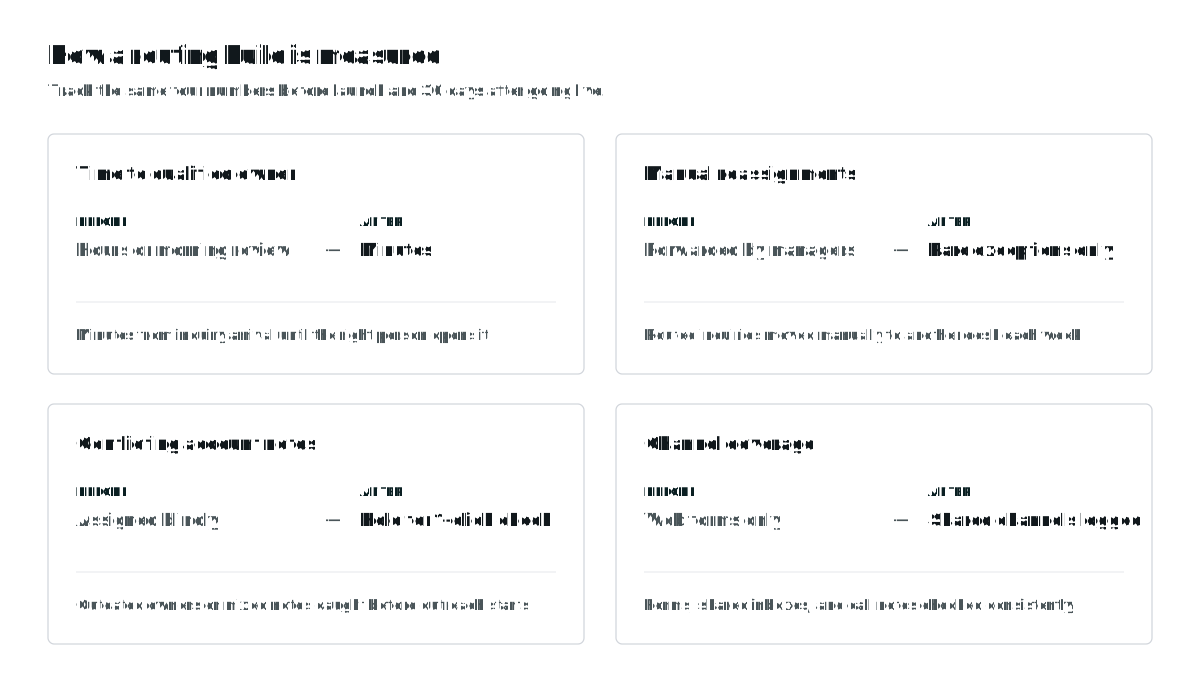
Whether you adjust your existing CRM workflows, adopt dedicated lead routing software, or build a custom integration, tracking concrete operational metrics before and 30 days after changes go live shows whether the bottleneck is truly resolved:
Review Your Workflow With an Automation Engineer
If your team still spends time investigating customer history across tabs or manually reassigning incoming inquiries, book a 30-minute operational consultation.
If helpful, you can bring a few examples of inquiries that required manual investigation, reassignment, or coordination across multiple systems. You don't need to prepare a formal process document, and please do not send unredacted customer records or sensitive personal information.
In 30 minutes, we will help you determine:
- Where the workflow breaks down across your current intake channels and handoffs.
- Whether existing software can solve it through native CRM settings or a dedicated routing product.
- Whether custom integrations are justified based on your systems and inquiry volume.
- What implementation and ongoing maintenance would involve if custom orchestration is the right fit.